Menu-driven batch utility for desktops and non-touch gaming laptops.
v2.5 StableEverything you need to squeeze maximum FPS, lower latency, and reclaim resources on Windows 11 desktops and laptops without touch hardware.
A comprehensive, menu-driven batch script to optimize Windows 11 for maximum gaming performance on non-touchscreen desktops and laptops. All changes are logged and reversible with built-in undo functionality and automatic restore point creation.
logs/nontouch_gaming_optimizer_YYYYMMDD_HHMMSS.log for audit trail.Note: Results vary based on hardware, game, and initial Windows configuration. Systems already optimized may see smaller gains.
Squeeze every frame out of your hardware with CPU, GPU, and RAM optimizations.
Minimize latency from mouse/keyboard input to on-screen response.
Lower ping, reduce packet loss, and optimize network stack for online gaming.
All optimizations tested for stability - performance without crashes.
Run the script with admin rights, create a restore point, and apply the recommended preset in minutes.
Grab win11_nontouch_gaming_optimizer.bat from GitHub and place it anywhere (e.g., C:\Optimizers).
Right-click “Run as administrator”. The script confirms elevation and launches its menu.
Select option [3] or run the recommended flow to snapshot your system automatically.
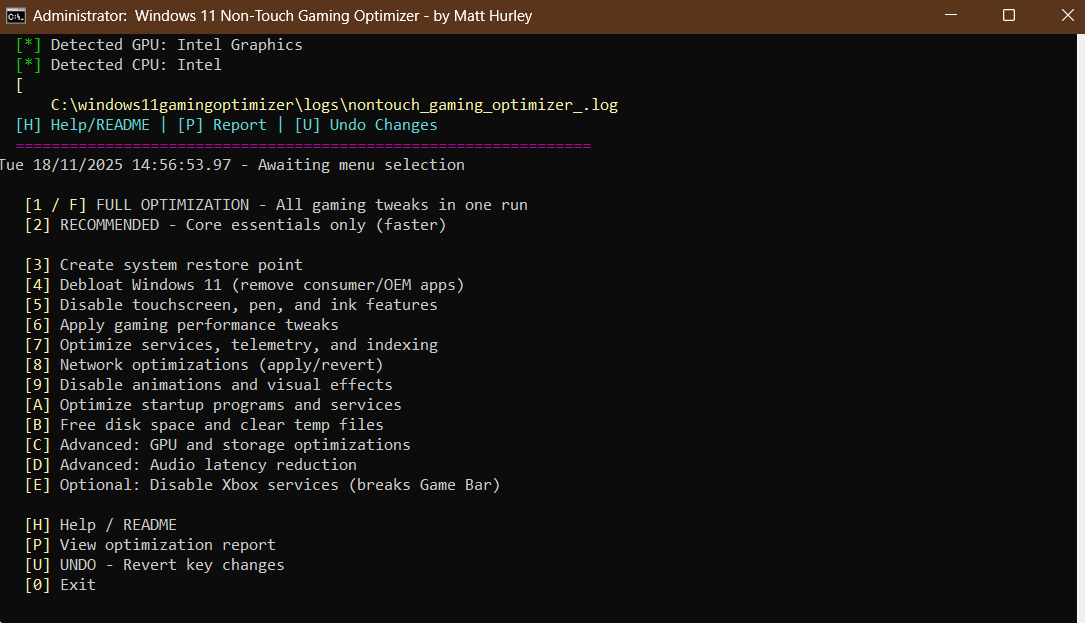
Choose [2] for the safe preset or [1/F] for the full 12-step optimization, then reboot.
Pick the full automation or use granular steps to fine-tune exactly what you need.
Runs all 12 optimization passes in sequence (~10 minutes).
Restore point, debloat, gaming tweaks, network polish (~5 minutes).
Restore point creation, debloat, disable touch features, performance tweaks, telemetry trim, network stack, visual effects, startup, and disk cleanup.
GPU/storage latency tuning, audio latency, optional Xbox service disable with confirmation.
View applied optimizations, gather system info, or revert to Windows defaults quickly.
Every optimization is accessible through a clean, color-coded batch interface.
Download v2.1 from GitHub and optimize your Windows 11 gaming system today. Star the repository for updates and report any issues.
Visit GitHub Repo