← Back to OmenCore

Windows 11 Non-Touch Gaming Optimizer

Menu-driven batch utility for desktops and non-touch gaming laptops.

v2.5 Stable

📖 View full project details on matthurley.dev

Purpose-Built for Non-Touch Gaming Rigs

Everything you need to squeeze maximum FPS, lower latency, and reclaim resources on Windows 11 desktops and laptops without touch hardware.

A comprehensive, menu-driven batch script to optimize Windows 11 for maximum gaming performance on non-touchscreen desktops and laptops. All changes are logged and reversible with built-in undo functionality and automatic restore point creation.

Core Optimizations

  • Debloat Windows 11: Remove consumer apps (Bing News/Weather, Clipchamp, Office Hub, Solitaire, TikTok, Spotify, Disney+), OEM bloatware, and promotional content while preserving Xbox Game Bar.
  • Disable Touch/Pen Features: Remove unnecessary touch, pen, ink, and handwriting components for desktop gaming systems.
  • Gaming Performance Tweaks: Ultimate Performance power plan, Game Mode enabled, GPU scheduling, input optimizations, Game DVR disabled.
  • Service Optimization: Reduce background CPU/RAM usage from telemetry (DiagTrack), indexing (Windows Search to manual), and SysMain (Superfetch).
  • Network Optimizations: Lower ping/latency with TCP/IP tweaks (auto-tuning, ACK frequency, MaxUserPort 65534), disabled delivery optimization, and removed throttling.
  • Visual Effects: Disable animations and transparency for better FPS - all visual effects set to "Best Performance".
  • Startup Optimization: Faster boot times with disabled Fast Startup delays and reduced startup tasks.

Advanced Features

  • GPU & Storage Optimization: 20+ GPU latency registry tweaks, SSD optimizations (TRIM enabled, defrag disabled, last access updates disabled), smart HDD/SSD detection.
  • CPU & Memory: Core parking disabled (all cores active), optimized page file based on RAM amount, memory compression enabled, paging executive disabled.
  • Audio Latency Reduction: High-priority audio processing for gaming and streaming with optimized multimedia system profile.
  • Mouse/Keyboard Input: Disable pointer precision (mouse acceleration), increased polling queue sizes, low latency flags for games.
  • Optional Xbox Service Disable: For users who don't use Game Bar or Xbox features (requires explicit "YES" confirmation to prevent accidents).
  • Vendor-Agnostic GPU Support: Works with NVIDIA GeForce, AMD Radeon, Intel Arc, and Intel integrated graphics - Windows-level optimizations that don't interfere with drivers.

Safety & Convenience

  • System Restore Point: Automatic restore point creation before changes (starts Volume Shadow Copy service if needed).
  • Comprehensive Logging: All actions timestamped and logged to logs/nontouch_gaming_optimizer_YYYYMMDD_HHMMSS.log for audit trail.
  • Registry Backup: Full backup of all modified registry keys before changes are applied.
  • Laptop Detection: Warns laptop users about battery impact and offers opt-out for power-intensive tweaks.
  • Verification Tool: Check which optimizations are currently active on your system.
  • Changes Summary: Clear summary of what was modified after each run.
  • Undo Function: Revert most changes back to Windows defaults (re-enables services, restores telemetry, animations, network tweaks, touch/pen, mouse acceleration with backed-up pointer settings).
  • Optimization Report: View system specs and applied optimizations in detailed report format.
  • Full & Recommended Modes: Run all 15 optimization steps at once (~5-10 min) or just the essentials (~3-5 min).

Performance Expectations

  • FPS gains: 5-15% improvement in CPU-bound games
  • Latency reduction: 10-30ms lower input lag
  • RAM usage: 500MB-1GB freed from background processes
  • Boot time: 10-30% faster startup
  • Network ping: 5-15ms reduction in online games

Note: Results vary based on hardware, game, and initial Windows configuration. Systems already optimized may see smaller gains.

Key Focus Areas

🎮

FPS Maximization

Squeeze every frame out of your hardware with CPU, GPU, and RAM optimizations.

Input Lag Reduction

Minimize latency from mouse/keyboard input to on-screen response.

🌐

Network Optimization

Lower ping, reduce packet loss, and optimize network stack for online gaming.

🛡️

Stability First

All optimizations tested for stability - performance without crashes.

Quick Start

Run the script with admin rights, create a restore point, and apply the recommended preset in minutes.

⬇️

1. Download

Grab win11_nontouch_gaming_optimizer.bat from GitHub and place it anywhere (e.g., C:\Optimizers).

🔐

2. Run as Admin

Right-click “Run as administrator”. The script confirms elevation and launches its menu.

🛡️

3. Create Restore Point

Select option [3] or run the recommended flow to snapshot your system automatically.

🚀

4. Optimize

Choose [2] for the safe preset or [1/F] for the full 12-step optimization, then reboot.

Menu Overview

Pick the full automation or use granular steps to fine-tune exactly what you need.

Quick

[1 / F] Full Optimization

Runs all 12 optimization passes in sequence (~10 minutes).

Recommended

[2] Essential Preset

Restore point, debloat, gaming tweaks, network polish (~5 minutes).

Individual

[3]-[B]

Restore point creation, debloat, disable touch features, performance tweaks, telemetry trim, network stack, visual effects, startup, and disk cleanup.

Advanced

[C]-[E]

GPU/storage latency tuning, audio latency, optional Xbox service disable with confirmation.

Utilities

[P] Report & [U] Undo

View applied optimizations, gather system info, or revert to Windows defaults quickly.

What Gets Optimized

Gaming Performance

  • Ultimate/High Performance power plans, Game Mode, GPU scheduling, and high-priority multimedia timers.
  • Game DVR disabled, Game Bar preserved, CPU/GPU priority raised for active games.
  • Mouse acceleration off, larger input queues, and audio latency reduction.

Network Stack

  • TCP auto-tuning, ack frequency, QoS, and Delivery Optimization tuned for competitive gaming.
  • NetworkThrottlingIndex disabled and MaxUserPort expanded to reduce congestion.

GPU & Storage

  • 20+ GPU latency tweaks, display priority changes, and hardware-accelerated scheduling toggles.
  • TRIM verification, NTFS last-access disable, 8.3 name creation off, and safe SSD cleanup.

Services & Tasks

  • DiagTrack, CEIP, advertising ID, Cortana suggestions, and Start recommendations disabled.
  • SysMain, Search indexing set to manual, Widgets/Teams/Copilot buttons hidden.

Safety Nets

  • Automatic restore point prompts, full undo option, and action logs per run.
  • Xbox/Game Bar preserved unless you explicitly confirm removal.

In-App Menu Preview

Every optimization is accessible through a clean, color-coded batch interface.
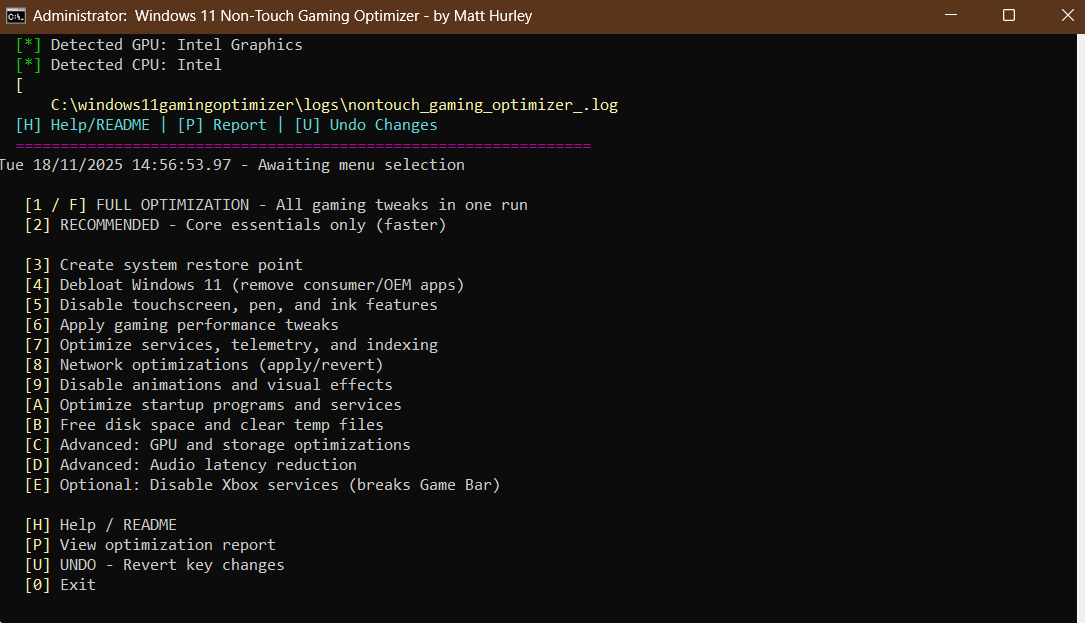
Windows 11 Non-Touch Gaming Optimizer Menu

Get Started

Download v2.1 from GitHub and optimize your Windows 11 gaming system today. Star the repository for updates and report any issues.

Visit GitHub Repo